
If you use Xray Test Management for Jira, the Snapshots integration with Xray (the Traceability Extension) lets you embed Xray test data and test runs into Confluence pages.
The integration adds three things to Snapshots:
-
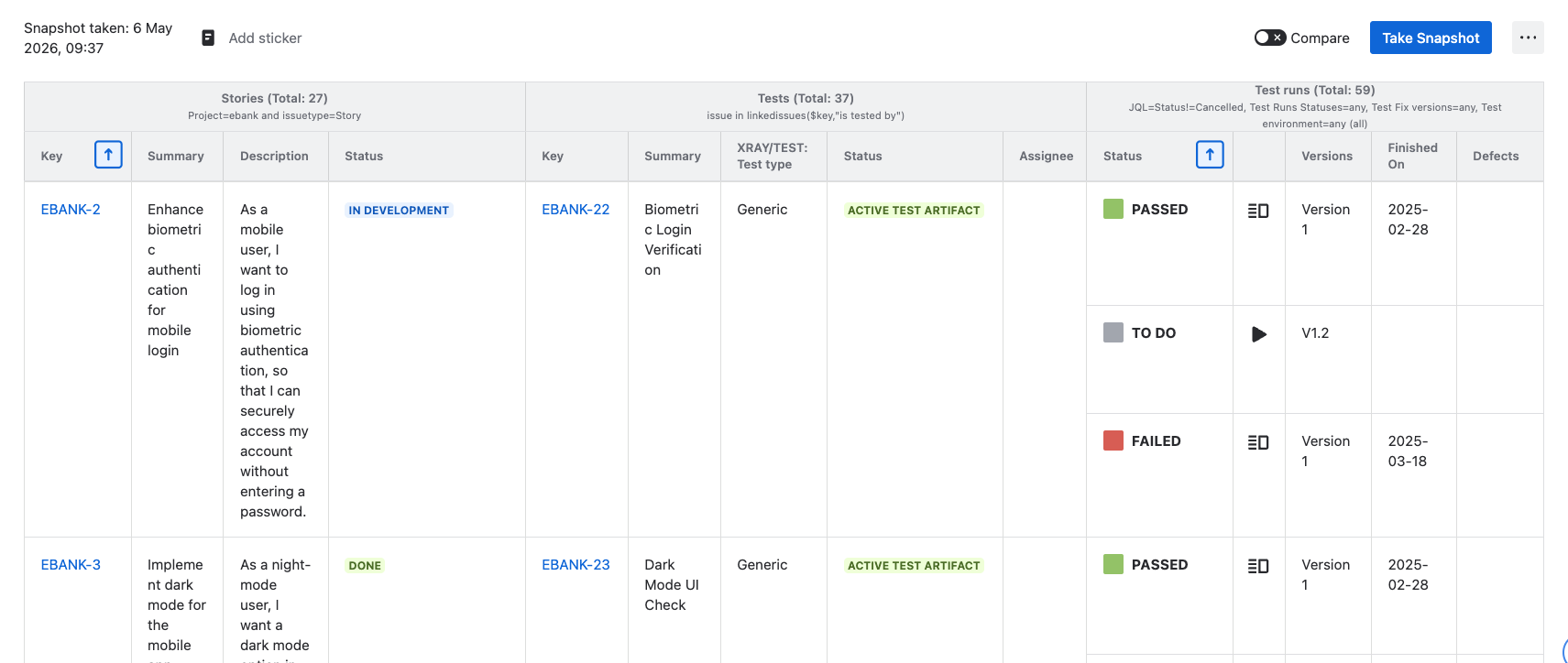
Xray-specific fields in the Snapshots macro. Beyond standard Jira fields, you can include Xray fields such as test type, steps, Gherkin scenarios, preconditions, and the latest test-run status — for any level whose issues are tests.
-
Test run levels. A new level type that retrieves test runs (which are entirely internal to Xray and invisible to Jira). A test run level always sits at the bottom of a snapshot, attached to a tests level above it.
-
The Snapshots Test Report macro. A dedicated, second macro for compliance-style detailed test reports — lists tests with their latest test runs, including step-by-step results, defects, and evidence.
Setting it up
The integration is available once you install and configure the Traceability Extension. See Configuring the Xray connection for the install and credential steps.
Once installed
You can:
-
Add Xray fields to existing snapshots when one of the levels is a tests level — see Adding Xray data to snapshots.
-
Add a test run level to existing snapshots, to show the run results alongside the tests — covered on the same page.
-
Build a detailed, compliance-style test report from scratch — see Snapshots Test Report macro.
What's next
-
Configuring the Xray connection — admin setup.
-
Adding Xray data to snapshots — author-side guide for fields and test run levels.
-
Snapshots Test Report macro — the detailed test reporting macro.