
A Confluence administrator has two site-level controls for snapshot automation: a master switch that enables or disables automation across the whole site, and a global API key that triggers every snapshot on a given page in one call.
Both live in Confluence admin → Apps → Snapshots Configuration → Automation.
Enabling or disabling automation site-wide
Snapshot automation is enabled by default. Every snapshot macro on the site can opt in to automation through its own Automation tab — see Triggering snapshots automatically.
To disable automation across the entire site, untick the master toggle on the Automation tab. While disabled:
-
The Automation tab on individual snapshot macros still appears, but enabling it has no effect — calls to the endpoint are rejected.
-
Existing automations stop working until the toggle is re-enabled.
Use this control if you need to suspend all automated snapshot triggering — for example, during incident response or while investigating unexpected automation activity.
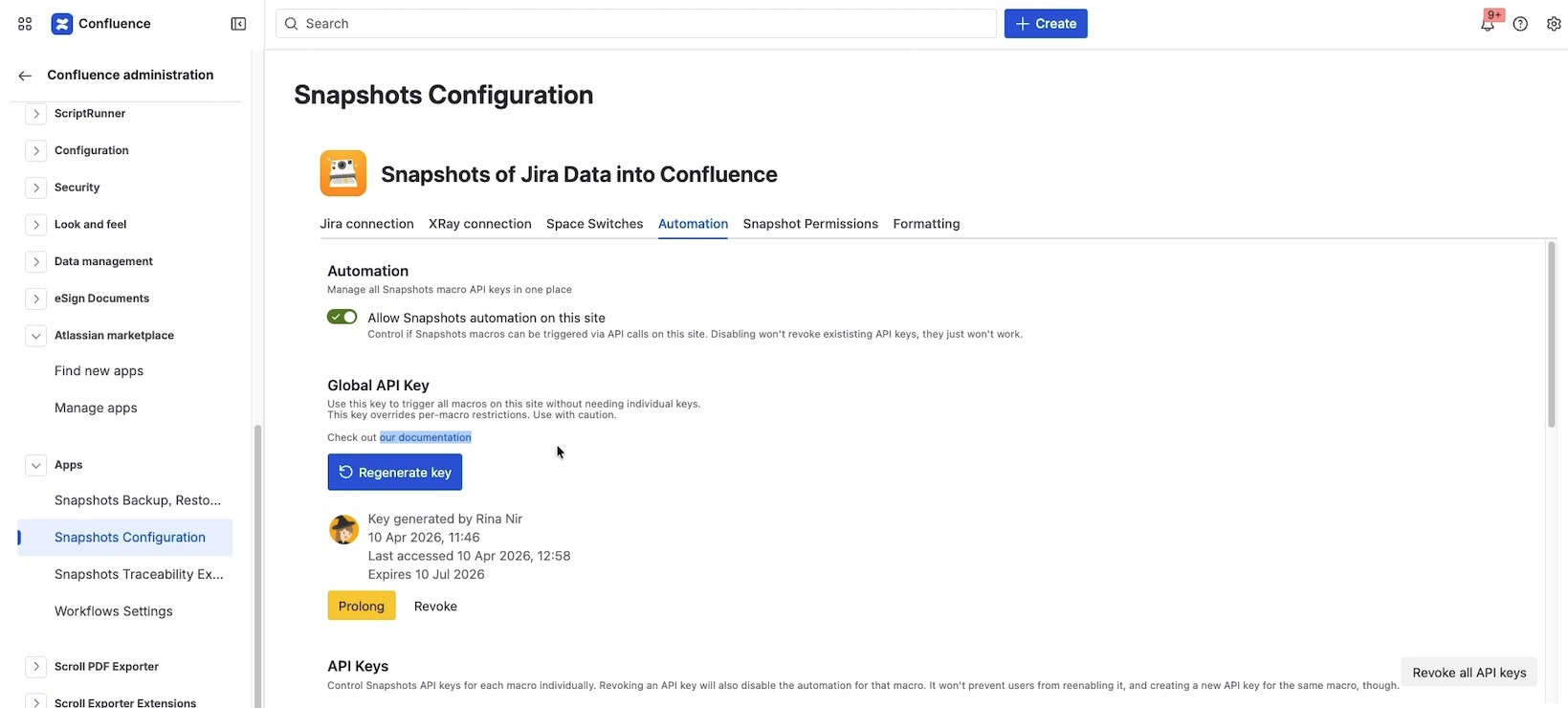
The global API key
A per-macro API key triggers a single snapshot. The global API key triggers every snapshot on a given page in a single call. It also lets you script flows that aren't tied to a specific macro — for example, creating a new page from a template and immediately taking all its snapshots.
The global key can only be enabled by a Confluence administrator.
The global API key is also what powers the built-in Take Snapshots on a Confluence page action in Jira Automation. See Triggering snapshots from automation.
Enable the global API key
On the Automation tab, generate a new global API key. Copy the value when it's shown — like the per-macro key, this is the only opportunity to copy it. Save it in your password manager or secret store.
The key is valid for three months by default. You can prolong it as many times as needed; this avoids the need to update every automation that uses it, while still requiring the administrator to keep it active deliberately.
Call the endpoint
Send a POST to the global endpoint with the page ID of the page whose snapshots you want to trigger:
curl --location --request POST 'https://snapshots-api.radbeeapps.com/take-snapshot/<PAGE-ID>' \
  --header 'jira-snapshots-api-key: <GLOBAL-API-KEY>'
Every snapshot on that page is queued for refresh. The data appears on the page within a few seconds.
Revoke the global API key
A revoked key stops working immediately. Generate a new one from the Automation tab when you're ready to issue a replacement.
Listing and revoking individual API keys
The Automation tab shows the list of API keys that have been generated on this site — both the global key and per-macro keys created by macro configurations. Each key can be revoked individually, or you can revoke them all at once.
Use this list to audit which automations are active and to clean up keys that are no longer in use.
What's next
-
Triggering snapshots automatically — the per-macro flow that authors use to wire up an automation.
-
Configuring Snapshots admin settings — the rest of the Snapshots Configuration area.
-
Triggering snapshots from automation — worked example using Jira Automation.