
Jira Automation is the easiest way to trigger a snapshot automatically
A Jira Automation rule can be triggered in reaction to many situations. From manual trigger on-demand, through fixed periodic recurrence, or when a release happens — Jira automation can be used.
Triggering a new snapshot can be done via a Jira automation rule. Here is a step-by-step set of instructions for how to configure such a rule:
-
Triggering snapshots automatically for the snapshot you want to trigger via automation.
-
Copy and keep the two details provided in the snapshot macro configuration screen:
-
The web request URL
-
The API key
-
-
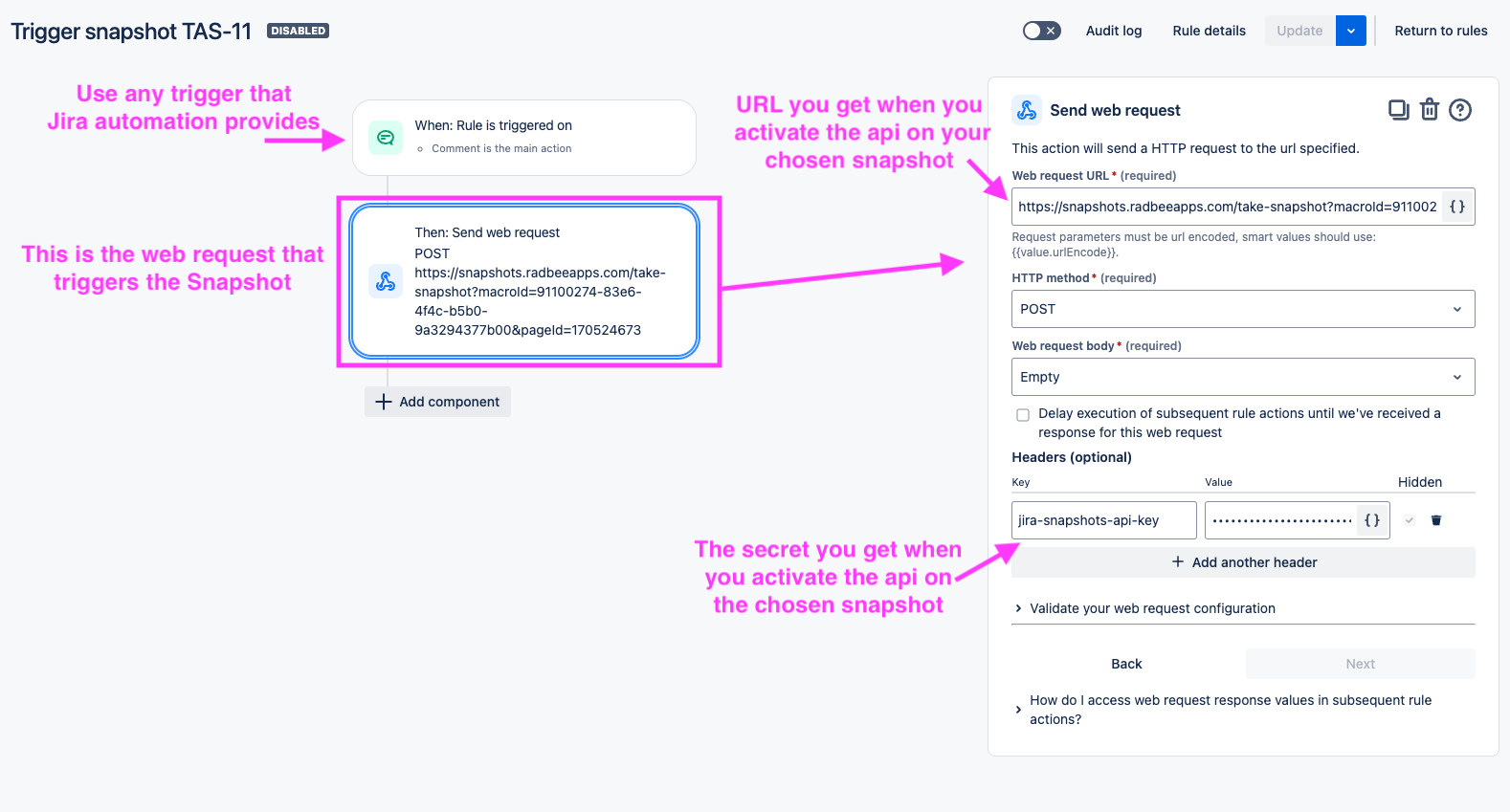
Define a Jira Automation rule, and in this rule, incorporate a "Send Web Request" action. This is the action that will call the snapshot endpoint. Set these parameters:
-
In the "Web request URL" — paste the web request URL from snapshot.
-
HTTP method: set to POST.
-
Web request body: set to EMPTY.
-
Headers: set a header that has these values:
-
Key:
jira-snapshots-api-key -
Value: set the API key from snapshot.
-
-
Troubleshoot failure code 411
We have seen sometimes that a perfectly valid configuration results in an automation that fails with a response code 411.
To resolve those situations:
-
To the failing "Send web request" action, add a header:
-
Key:
Content-Length -
Value:
0
-