
Some use cases require the automatic creation of Confluence pages with Snapshots, including the automatic population of the data from Jira.
For example, if weekly status report pages are to be created automatically.
There is now a simpler way to do the last step. Take Snapshots on a Confluence page is a Snapshots action for Jira automation that replaces the Send web request step described below. It needs only the content ID of the page and the global API key, with no URL and no headers to configure. Use it if you are building your rule in Jira.
The web request is still the route for Confluence automation, and for any other tool, because the action is currently available only in Jira automation.
Basics
To implement the use case, we'll use several components:
-
Define a Confluence Template that has the required content of the page, including one or several Snapshot macros. We'll use this template as the easiest way to assign content of a page that is created through Automation.
-
Enable the Global API Endpoint for Snapshots. See Administering Snapshots automation for how to do this.
-
Use Jira Automation (or Confluence Automation) to create a new page from the template you defined, and then trigger the snapshots. See details of this Automation rule below.
Jira Automation Example
.jpg?cb=4eb46fbaf4f7a6351423b4d320f13119)
The flow of the rule is like this:
-
Trigger the rule: In the example, the rule is manually triggered by a user.
-
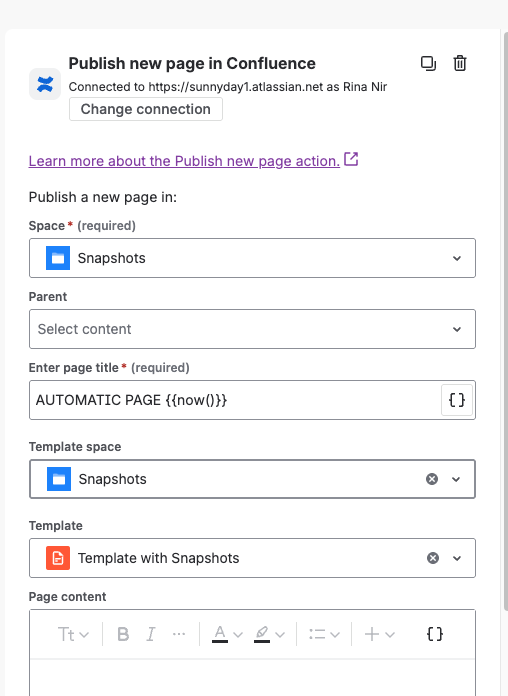
Create the new page, using the template as its content.
-
Log messages: these are optional. They are useful for troubleshooting.
-
Send a web request:
-
The Web request URL is:
https://snapshots-api.radbeeapps.com/take-snapshot/{{content.id}} -
Two headers:
jira-snapshots-api-key, andContent-Length.jpg?cb=d44831016d260cdb7fc219beeabd488e)
-
If you are building the rule in Jira, replace this Send web request step with the Take Snapshots on a Confluence page action. Give it the content ID of the page created by the previous step and the global API key, and it does the same job with nothing else to configure.
A worked example
For a full recipe that keeps the generated report pointed at whichever version your team is working on, see Automating test coverage pages for your current version. It combines this pattern with a snapshots variable, so rolling over to the next version is a single change in one place.