
Dress-ups let you shape a snapshot beyond what comes from Jira, without changing the underlying data. You can rearrange rows to a different order, and add your own text rows for context, notes, or callouts. The Jira data itself is untouched: dress-ups sit on top of it, saved with the snapshot and shared with every page viewer.
Today the Dress-ups group includes two capabilities:
-
Ordering rows manually. Set a fixed, custom order for the snapshot's rows.
-
Adding text rows. Insert your own text rows above or below any Jira row, or below the header.
Entering dress-up mode
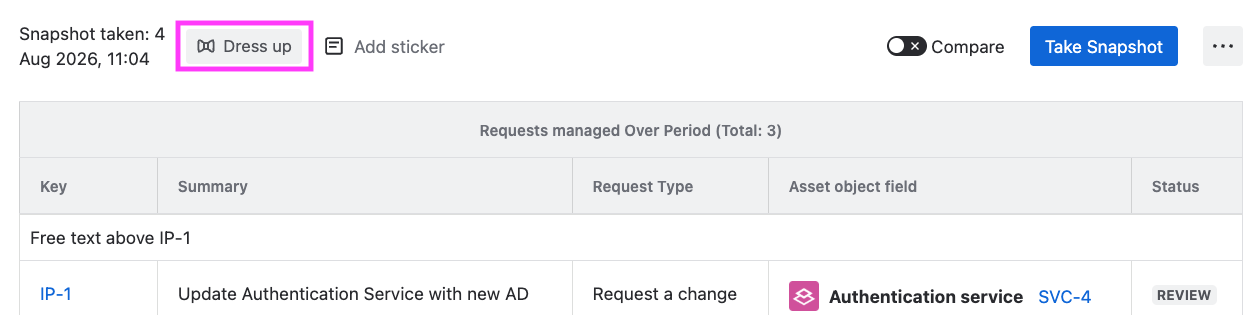
Above the snapshot, click Dress up to open dress-up mode. You start in text-row mode by default: hover over any Jira row to add a text row pinned to it. To rearrange rows instead, click Reorder to switch to reorder mode.
You need edit permission on the Confluence page to dress up a snapshot. Page viewers who only have view permission see the resulting dress-ups on the snapshot but can't change them.
Saving your dress-ups
When you're done, click Save. A confirmation dialog reminds you that a new version of the Confluence page will be created. Everyone who opens the page then sees the snapshot with your dress-ups applied.
How dress-ups behave over time
Dress-ups are attached to the snapshot, not to a single point in time. They survive when you take a new snapshot:
-
A text row pinned to a Jira issue stays pinned to that issue on every new snapshot, as long as the issue is still returned by the snapshot's JQL. If it isn't, the text row becomes orphaned; see Adding text rows for how to handle this.
-
A manual row order is preserved for every issue that was present when you set it. New issues appear at the bottom of the table until you reorder again.
If you want to remove a dress-up entirely (all reordering, or all text rows), each sub-feature has its own reset action. See the individual pages.
Dress-ups and plain snapshots
A snapshot with no dress-ups applied is called a plain snapshot. Its rows appear in the order defined by the JQL sort and the macro configuration, with no author-added rows. You can go from a plain snapshot to a dressed-up one and back, without affecting the Jira data underneath.
What's next
-
Ordering rows manually. Set a fixed, custom order for the snapshot's rows.
-
Adding text rows. Insert your own text rows above or below any Jira row.