
Snapshots maps onto two distinct permissions: viewing a snapshot and taking a new one.
Principle. Anyone with view access to a Confluence page sees the snapshot exactly as every other page viewer does — no Jira license required. Taking a new snapshot generates a new page version and therefore requires edit access to the page, with one optional override that an administrator can grant.
This page covers the permission rules and the override.
Viewing a snapshot
A snapshot is rendered from data stored on the Confluence page. Anyone who can see the page can see the snapshot — same data, same formatting, same level structure. Their permissions in Jira don't matter.
This is the property that makes Snapshots useful for sharing Jira data with stakeholders who don't (and shouldn't) have access to Jira. See How snapshots work — Who can see a snapshot for more.
Taking a new snapshot
Taking a new snapshot creates a new version of the Confluence page. Confluence requires page-edit access to create a new version, so by default Snapshots requires edit access to the page for the Take snapshot button to be active.
Page viewers without page-edit access see the snapshot but find the Take snapshot button disabled.
This default behavior is intentional. It lets the page owner control how often the snapshot is refreshed. When the snapshot is shared with stakeholders or external page viewers, they can read the current data without being able to refresh it themselves — refresh stays in the page owner's hands.
Letting selected users take snapshots without edit access
There are scenarios where you want a stakeholder to be able to refresh the snapshot — for example, a customer reviewing a status report ad hoc — but you don't want them to edit the page itself (changing the macro configuration, adding text, restructuring the content).
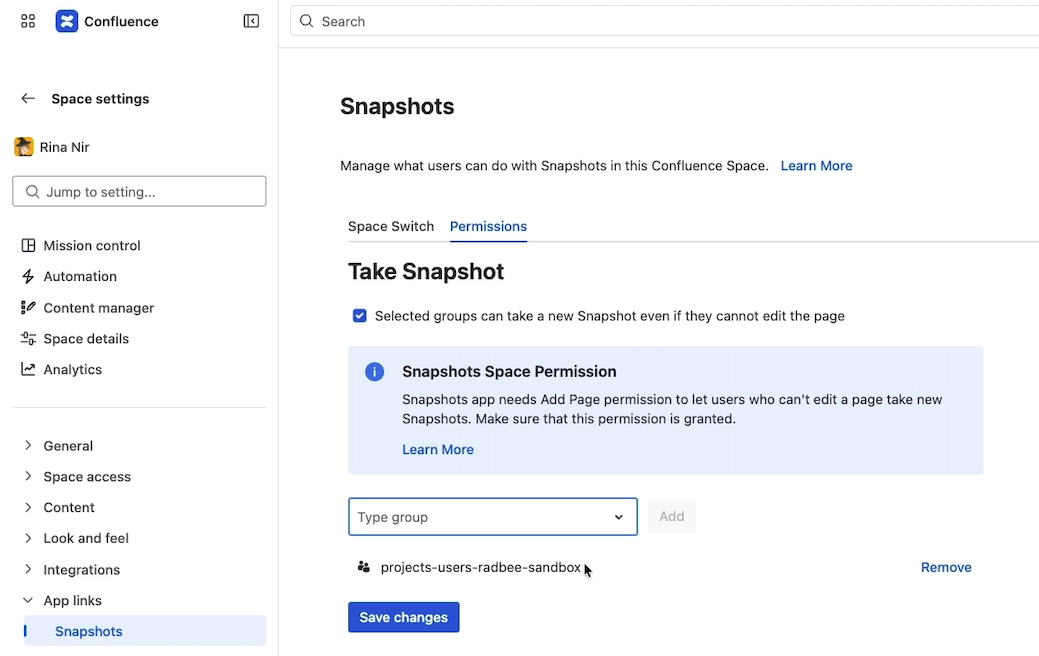
A space administrator can grant a Confluence group the ability to take new snapshots without granting page-edit access.
To configure the override:
-
As a space admin, open the space settings.
-
Open App links → Snapshots → Permissions.
-
Tick Selected groups can take a new snapshot, even if they cannot edit the page.
-
Add the Confluence groups that should have this permission.
-
Save.
Members of the listed groups can now refresh snapshots on pages in this space, even on pages where their effective permission is view-only. Their ability to edit the page (change the macro configuration, add or modify content) is not affected — that still requires regular page-edit access.
Disabling the override site-wide
The override above is enabled by default for every space, available to space admins. A Confluence administrator can disable it across the whole site so that no space admin can grant take-snapshot to non-editors.
To turn the override off site-wide, see Configuring Snapshots permissions (admin) — the Snapshots Permissions tab in Snapshots Configuration.
What's next
-
How snapshots work — the underlying data model that informs these permissions.
-
Disabling Snapshots for a space — preventing snapshots from rendering at all in a given space.
-
Configuring Snapshots admin settings — the site-wide configuration that toggles the override capability.