
Backing up Snapshots metadata can also be done via an API endpoint.
With this endpoint, you can, for example, include the snapshots backup in your automatic backups of the platform itself.
For explanation about the scope and purpose of snapshots backup, check out Backup and Restore, and Migration Between Sites
The backup file will be suitable for restoration on Cloud.
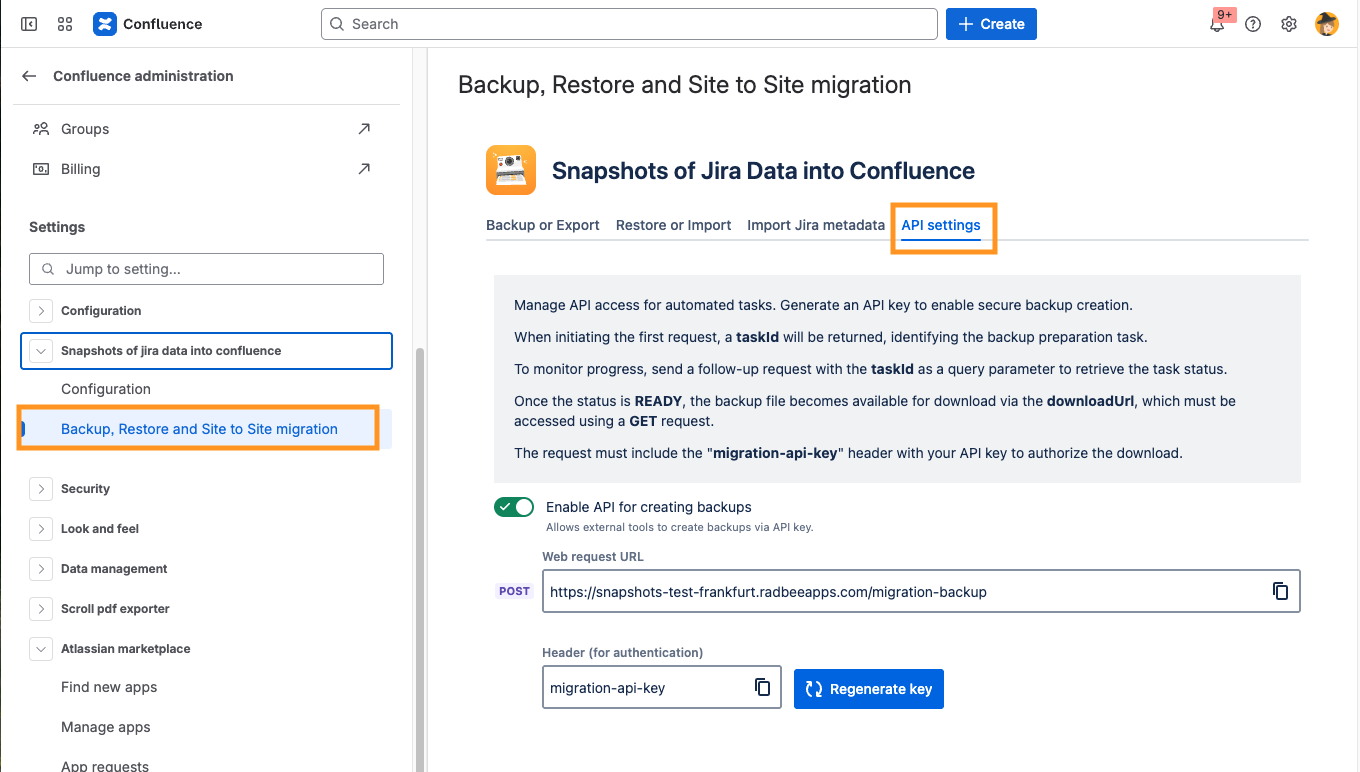
Follow these steps:
-
Under Confluence Administration
-
Navigate to Manage Apps → Snapshots of Jira data into Confluence → Backup, Restore, and Site to Site Migration
-
Under the tab 'API setting':
-
Enable the API
-
Retrieve the Web request URL and the generated key. In the snippet below, these will be designated as
<WEB REQUEST URL>and<API KEY>.
-
How to retrieve the backup zip via the API
Retrieving the backup zip file requires this sequence:
-
Trigger a new task to create the backup file:
POST <WEB REQUEST URL>
Header: migration-api-key: <API KEY>
The response will include the
<TASK ID>(which you will need at the next step). -
Check the status of the task, until it's completed:
POST <WEB REQUEST URL>?taskId=<TASK ID> Header: migration-api-key: <API KEY> -
When the task is completed, the response includes the download URL.
-
Download the resulting zip:
GET <DOWNLOAD URL>
Header: migration-api-key: <API KEY>
Here is a snippet that shows a complete sequence:
% curl -X POST -H "Content-Type: application/json" \
       -H "migration-api-key: xx-b6be-41d7-ad99-a3ddaea163ea" \
       https://snapshots-api.radbeeapps.com/migration-backup
{"taskId":"prepare-for-migration-backup-task-ffc1236a-feed-42fd-9c02-b9ea5378bf9f","status":"IN_PROGRESS","downloadUrl":""}

% curl -X POST -H "Content-Type: application/json" \
       -H "migration-api-key: xx-b6be-41d7-ad99-a3ddaea163ea" \
       "https://snapshots-api.radbeeapps.com/migration-backup?taskId=prepare-for-migration-backup-task-ffc1236a-feed-42fd-9c02-b9ea5378bf9f"
{"taskId":"prepare-for-migration-backup-task-ffc1236a-feed-42fd-9c02-b9ea5378bf9f","status":"READY","downloadUrl":"http://default-2-dot-snapshots-test-frankfurt.ey.r.appspot.com/migration-backup?taskId=prepare-for-migration-backup-task-ffc1236a-feed-42fd-9c02-b9ea5378bf9f-result"}

% curl -X GET -H "migration-api-key: xx-b6be-41d7-ad99-a3ddaea163ea" \
       "https://snapshots-api.radbeeapps.com/migration-backup?taskId=prepare-for-migration-backup-task-ffc1236a-feed-42fd-9c02-b9ea5378bf9f-result" \
       --output downloadxx.zip